




If you’re a trader, you know the drill. You spend weeks hunting for an edge, fine-tuning your entries, and reading every “Psychology of Trading” book on Amazon. But if you aren’t journaling, you’re simply driving a race car without a dashboard. You might be moving fast, but you have no idea when the engine is about to overheat.
At UltraTrader, we live and breathe data. We know that the difference between a struggling retail trader and a consistent professional often comes down to one thing: a feedback loop. However, we also know that choosing a journal is a commitment. You’re entrusting a platform with your data, your history, and your hard-earned insights.
Today, the market for trading journals is more crowded than a “buy the dip” chatroom on a Tuesday morning. At the top of the mountain sits TradeZella, the standard-bearer for “surgical” analytics. We decided to put ourselves to the test in a “10-minute matchup”; an honest, head-to-head comparison using a real-world dataset.
We didn’t just look at the marketing pages; we got under the hood. Here is our unbiased, human-edited breakdown of how UltraTrader and TradeZella actually perform when the market is moving.
The “Import-to-Insight” Challenge
To keep this fair, we used a specific Repeatable Test Workflow. We took a dataset of 269 trades and applied the exact same 5 tasks to both platforms. Of course, both platforms offer many more features, but we had one task in mind. Get an insight as fast as possible.
The Test Results
| Task | UltraTrader Results | TradeZella Results |
|---|---|---|
| 1. Import Dataset | Success. Step-by-step template-based process. | Success. Step-by-step template-based process. |
| 2. Tag/Strategy Analysis | Strategy Tab. Aggregates PNL, Win Rate, and Expected Value by custom strategy tags. | Playbook System. A structured setup for strategy rules, notes, and dedicated “Playbook Reports”. |
| 3. Hour Performance | Best and worst times of the day. Lowest P&L loss among active hours. | Hourly Breakdown. Offers 15-minute window analysis. |
| 4. Win Rate by Duration | Intraday/Multiday analysis. | Dynamic Hold Times. Analyzes profitability by custom duration. |
| 5. Portability | Native App. High-rated iOS/Android apps for on-the-go tracking. | Web-Responsive. No dedicated native app; browser-only. |
The Scorecard (0–5 Scale)
We’ve scored both platforms across five critical dimensions based on our 10-minute head-to-head test.
Import and Ease of Use
One of the biggest misconceptions in the journaling world is that you can just “dump a random CSV” into any platform. In reality, both UltraTrader and TradeZella are strictly template-based when it comes to manual file uploads. If your data isn’t perfectly aligned with their specific headers, the import will fail. Both platforms offer a variety of options for a trading journal with auto-sync. But in this match, we chose to test .csv file import.
The UltraTrader Path:
We designed our manual import process to be lean. You click the Create Portfolio, select “CSV Upload,” and you are immediately prompted to download our proprietary template. You must reformat your data to match our specific headers (Symbol, Side, PnL, Entry/Exit Dates, etc.) before the system will accept the file. While we offer automated syncing for many brokers, any custom file work requires this rigid adherence to our layout.
The TradeZella Path:
TradeZella uses a generic CSV path that is equally strict. By clicking on “File Upload,” you must use their specific template. They are particularly precise about formatting: dates must be m/d/y, time must be in 24h format, and even “Spread” values must match their internal logic. It’s a powerful gatekeeper that ensures data integrity, but it means you cannot simply upload an export from a random spreadsheet without manual prep.
UI/UX and Portability (The Native Advantage)
In 2026, a desktop-only journal is, to be honest, a legacy tool.
The UltraTrader Native Edge:
We built a native mobile app (4.3 stars, 50k+ downloads) because we know traders are mobile. Our app isn’t just a “mobile site” wrapped in an icon; it’s a high-performance tool with native speed and push notifications. This allows you to journal your emotional state the moment a trade closes—capturing raw psychological data that is often lost by the time you get back to your desktop. For a modern trader, this mobility is a massive advantage for consistency.

Start Journaling Today

Start Journaling Today
The TradeZella Reality:
TradeZella remains “web-responsive.” It looks good on a phone screen, but it’s still a website running in a browser. You don’t get native speed, push notifications, or the same level of integration with your phone’s notification system. For a platform that positions itself as the “premium” choice, the lack of a native mobile app is a significant omission for the on-the-go trader.
Insight Depth (Tagging and Strategies)
This is about moving from “What happened?” to “Why did it happen?” and which strategies are actually paying the bills.
UltraTrader’s Dashboard:
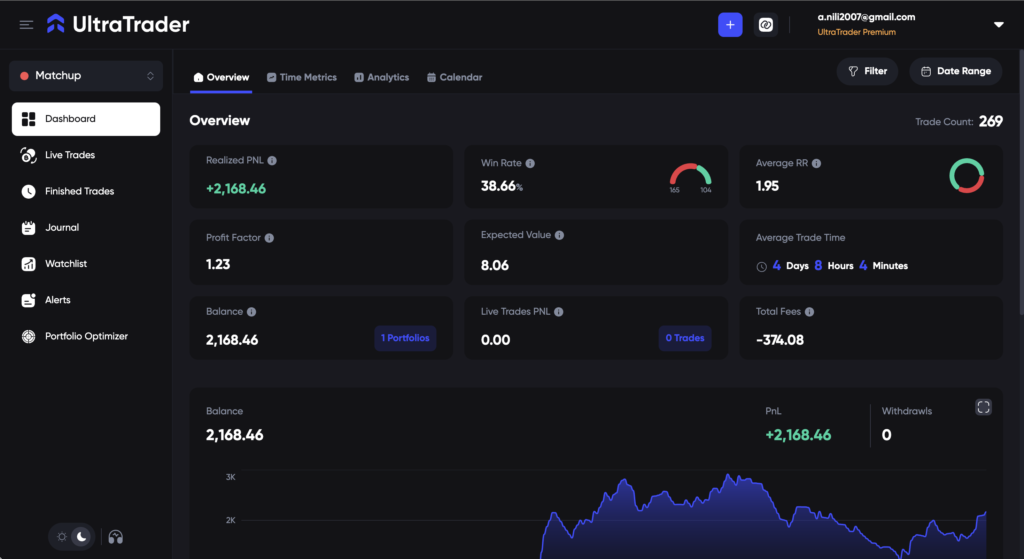
We believe your strategy should be at the forefront of your review. Our Strategy Tab allows you to create custom tags (e.g., “Bullish Breakout”, “Mean Reversion”) and assign them to your trades. Our analyzer then automatically calculates Expected Value (EV), Profit Factor, and Win Rate specifically for each strategy tag. In our test, we didn’t just see a total PNL; we saw which specific setup was our “ace” and which was a “leak.” We also support psychological tagging (e.g., “FOMO”, “Impulsive”) to help you see the emotional cost of your trades.
What TradeZella Offers:
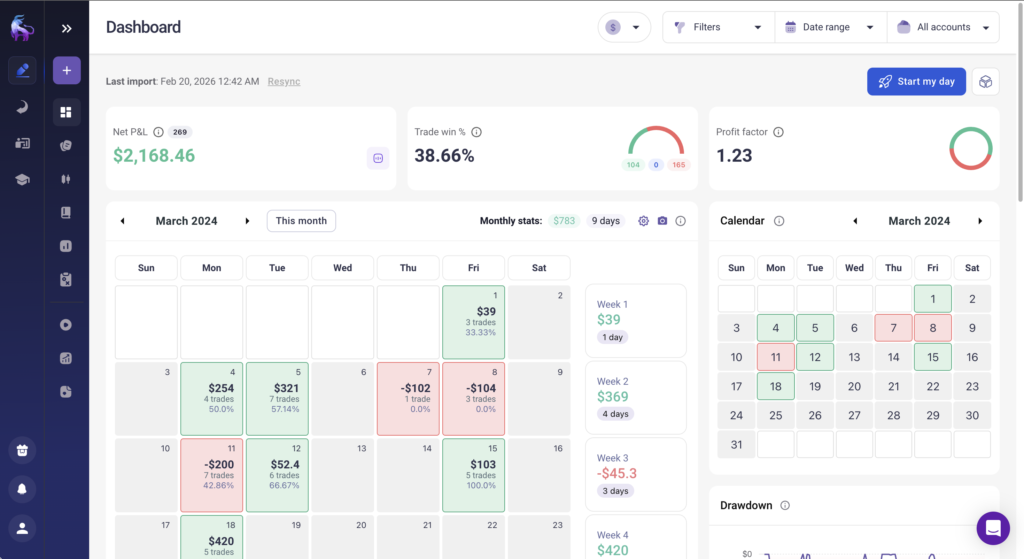
Zella uses a more formal Playbook System. A Playbook is more than a tag; it’s a dedicated setup where you can define the rules and criteria for a specific strategy. Their “Reports: Playbook” section allows for deep cross-analysis. For instance, checking if a specific Playbook only works on certain symbols or during specific timeframes. They also use a “Zella Score” to grade your risk management and discipline on a trade-by-trade basis.
Variety of Reports
UltraTrader’s Analytics Engine:
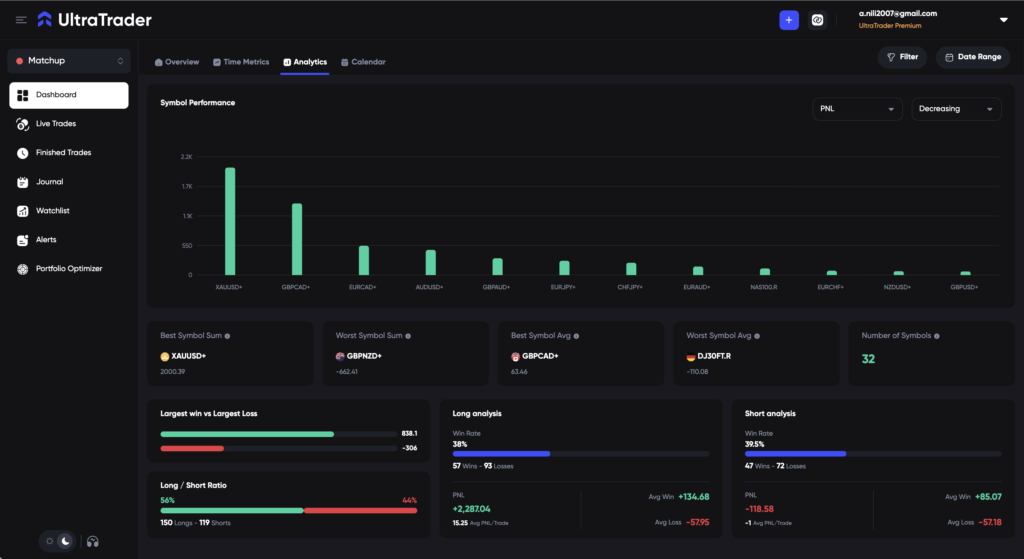
We go beyond the trade log to provide a bird’s-eye view of your performance metrics. Our Analytics Dashboard visualizes your Equity Curve, Profit Factor, and Symbol Performance (ranking your assets by P&L), etc. We also provide a dedicated Time Metrics report that visualizes your Win-rate and Average Hold Time across different durations. Crucially, we offer Live Trade Tracking, allowing you to monitor your running P&L in real-time alongside a built-in Watchlist and Telegram-integrated Alerts.
TradeZella’s Reports 2.0:
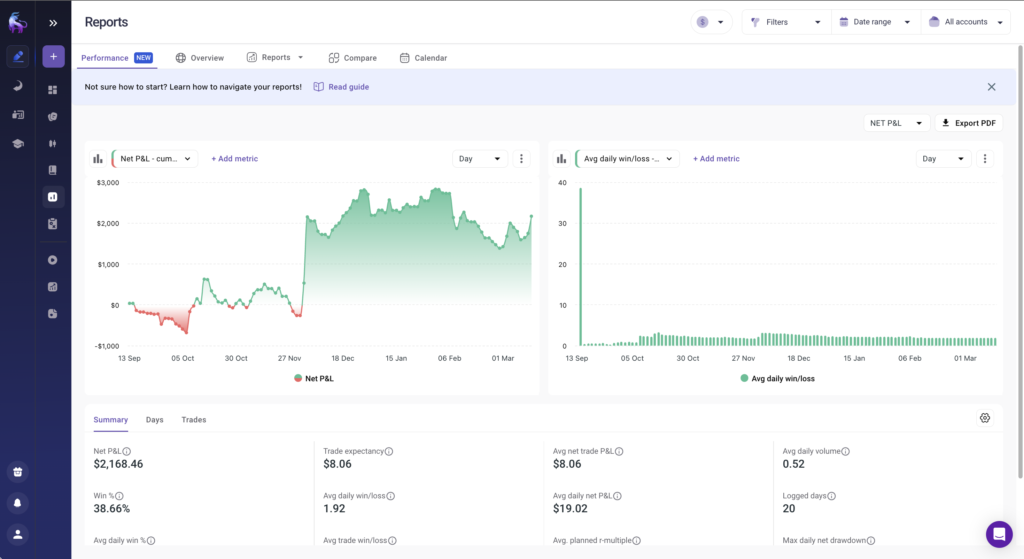
Zella’s report suite is built for the post-trade “autopsy.” They offer Trade Replay (tick-by-tick visual playback of your entries and exits), Progress Trackers (to monitor your goals), and Playbooks. Their ‘Notebook’ acts as a fully integrated trading diary, and their Zella Score provides a unique performance score based on risk-to-reward and consistency metrics.
Value for Money
The Paywall Fairness Check:
We offer a Free Forever tier ($0/mo). It allows for manual entry and full access to our analytics dashboards, win-rates, and profit factors. Our Premium tier, which unlocks the template-based CSV imports and broker connections, is aggressively priced at ~$12.50/mo (billed annually). We believe high-level analytics should be accessible to every trader. Check UltraTrader’s pricing.
TradeZella’s Pricing:
Zella has no free tier. You start at the “Essential” plan (~$24/mo annual) or the “Pro” plan (~$33/mo annual). While they show you the import flow before you hit the paywall, you cannot actually use the tool without a financial commitment. You are paying a premium for their brand and their “Reports 2.0” engine.
The Verdict: Who Wins the 10-Minute Matchup?
| Dimension | UltraTrader | TradeZella | Zella’s “Zella Score” and Playbooks are industry-leading. |
|---|---|---|---|
| Import Flow | 4 | 4 | Both require strict template reformatting; we offer a slightly faster 4-step flow. |
| Ease of Use | 5 | 3 | UltraTrader’s native mobile app is a massive advantage. Zella is browser-only. |
| Insight Depth | 4 | 5 | TradeZella’s “Reports 2.0” offers more “surgical” 2D cross-analysis. |
| Variety of Reports | 3 | 5 | Zella’s “Zella Score” and Playbooks are industry-leading. |
| Value for Money | 5 | 4 | We offer a Premium tier at ~$12.50/mo (annual) vs Zella’s ~$24-$33/mo (annual). |
| Total | 21/25 | 21/25 | UltraTrader Wins on Agility & Value! |
Well, picking the best platform isn’t easy, right? Let’s make it simple:
You should choose UltraTrader if…
You want a clean, fast, and mobile-ready journal that lives in your pocket. If you value a native mobile app, real-time live trade tracking, and a built-in simulator for the best possible price (~$12.50/mo), we built this for you.
You should choose TradeZella if…
You are a desktop-first data nerd who needs the deepest possible strategy review. If you need tick-by-tick trade replay and don’t mind the ~$400/year price tag or the lack of a native mobile app, their analytical depth is unmatched.
Choosing the best trading journal is important, but commitment to journaling your trades is much more important. Start journaling today!