
A Complete Trading Journal Guide: From Mistakes To Mastery

Last updated: December 2, 2025
Every trader knows the feeling. You promise yourself you will be disciplined. You swear you will follow your plan. Then the market moves fast, emotions kick in, and you repeat the same mistake you made last week.
If this sounds familiar, you are not alone. The difference between traders who stay stuck and traders who grow is not a magic indicator. It is a feedback loop. That feedback loop is your trading journal.
In this guide, you will learn what a trading journal is, why it is so powerful, what to include in it, and how to build one that actually helps you improve. You will also see how a modern trading journal app like UltraTrader can take you from messy mistakes to structured mastery.
Why Most Traders Stay Stuck In The Same Mistakes
Most traders do not fail because they do not know enough about charts. They fail because they repeat the same behaviors over and over without realizing it.
Some common patterns:
- Overtrading after a loss
- Increasing position size when angry or excited
- Entering late from FOMO
- Ignoring the stop loss “just this one time.”
- Closing winners too early and letting losers run
If all you look at is your account balance or P&L, you only see the result, not the reasons behind it. You know you lost money, but you do not see the pattern that led to that loss.
Without a structured way to record your trades, decisions, and emotions, your brain will always rewrite history to make you feel better. You will forget details, justify bad trades, and keep repeating the same behaviors.
A trading journal breaks this cycle. It turns random trades into data. It turns emotions into something you can see and manage. It becomes the mirror that shows you what is really happening in your trading.
What Is A Trading Journal, Really?
A trading journal is more than a simple list of trades.
At its core, a trading journal is a structured record of your trading activity and decisions. It includes:
- The trades you take
- The reasons you took them
- How you felt before, during, and after the trade
- The result and what you learned
A broker statement shows only numbers. A trading journal shows your process.
Think of it like this:
- Broker history = what happened
- Trading journal = why it happened and what you will do next time
When you use your journal consistently, it becomes a learning tool. It helps you see patterns, test strategies, and build rules that match your real behavior, not just theory.
Why A Trading Journal Is So Important For Traders
If you ask consistently profitable traders what helped them the most, a trading journal is almost always in the top three answers. Here is why.
1. Pattern Recognition
Your journal shows you:
- Which setups work best for you
- Which conditions do you struggle with
- How does your performance change by time of day, day of week, or market type
Over time, you can clearly see “this is where I make money” and “this is where I lose it”.
2. Better Risk Management
By logging position size, risk per trade, and R:R, you can see if you are respecting your rules. You may notice that your biggest drawdowns come from breaking your own limits, not from expected losses.
3. Emotional Control
You cannot remove emotions, but you can track them. When you record how you feel and what you do under stress, you start to understand your own emotional triggers. That awareness alone reduces impulsive decisions.
4. Strategy Development And Iteration
You can test ideas in a structured way:
- Try a new filter
- Log the trades that fit this rule
- Review after 20, 50, or 100 trades
Your journal becomes proof. You no longer rely on a “feeling” that a strategy works.
5. Accountability And Discipline
Writing things down creates responsibility. You know you will have to look at this trade later and justify it to your future self. That makes it easier to say no to low-quality setups.
In short, a trading journal turns your trading from guessing to learning.
What To Include In A Powerful Trading Journal
You do not need a complex system with hundreds of fields. A good journal is complete enough to be useful, but simple enough that you will actually use it.
Here is what a strong trading journal should include:
Core Trade Data
These fields describe the basic facts of the trade:
- Date and time
- Market or instrument (BTCUSDT, EURUSD, TSLA, etc.)
- Direction (long or short)
- Position size
- Entry price, stop loss, and target
- Exit price
- Fees
- Result in currency and in R (risk units)
This gives you the numeric backbone of your journal.
Context And Reasoning
This section tells the story behind the numbers:
- Strategy or setup name (for example “Breakout”, “Mean reversion”, “News fade”)
- Timeframe(s) used
- Market conditions (trending, ranging, high or low volatility, news events)
- Reason for entry (what did you see that made you decide “this is a valid trade”)
- Reason for exit (hit stop, hit target, manual close, partial close, time-based exit)
- Optional: screenshot or chart link
This information lets you group trades by setup and market condition. That is how you find patterns later.
Psychology And Process
Some of the most valuable insights in your journal will come from your notes about yourself:
- Emotion before the trade (calm, excited, fearful, bored)
- Emotion during the trade
- Emotion after the trade
- Did you follow your trading plan? (yes, no, partially)
- Short note to your future self
- Example: “Got in late from FOMO, ignore late entries near highs”
You can keep this simple with a 1 to 5 scale for emotions, plus one or two short sentences per trade.
When you combine data, context, and psychology, your journal becomes a fundamental tool, not just a list of trades.
Trading Journal Methods: From Notebook to Automated App
There are many ways to keep a trading journal. There is no single correct method. The best option is the one you can maintain consistently.
Let us look at the primary methods and how they compare.
Pen And Paper Journal
Pros:
- Very simple and accessible
- No apps or tools needed
- Can feel more personal and reflective
Cons:
- Hard to search or filter
- No automatic stats or charts
- Easy to lose or damage
- Time-consuming for active traders
This method can work well if you are a beginner with low trade frequency and you care more about emotional notes and reflection than analytics.
Spreadsheet Trading Journal (Excel or Google Sheets)
Pros:
- Customizable columns and formulas
- Basic stats like win rate, average R, and drawdown
- Can create charts and pivot tables
- Accessible from different devices if you use Google Sheets
Cons:
- Manual data entry is boring and error-prone
- Needs time to set up and maintain
- Gets messy as you add more complexity
- Linking screenshots and notes is not very smooth
Spreadsheets are a good middle ground. Many profitable traders started exactly like this.
Notion and Other Database Templates
Pros:
- Flexible, powerful databases
- You can link trades to strategies, notes, screenshots, and rules
- Easy to write longer reflections around your trades
Cons:
- Setup can be complex for beginners
- Easy to overdesign and never actually use it
- Still mostly manual, without broker integration

Notion trading journal is a great option if you love building systems and want much flexibility.
Dedicated Trading Journal Apps
Pros:
- Automatic import of trades from exchanges and brokers
- Clean trade history without manual typing
- Advanced analytics and dashboards
- Filtering by strategy, instrument, session, and more using tags
- Better experience for active, high-volume traders
Cons:
- Usually costs money
- You need to learn a new platform
- Some apps focus more on specific markets than others
Trading journal apps are ideal if you are serious about improvement and want to save time while getting better data.
Where UltraTrader Fits In This Spectrum
UltraTrader is a dedicated trading journal app designed for modern traders.
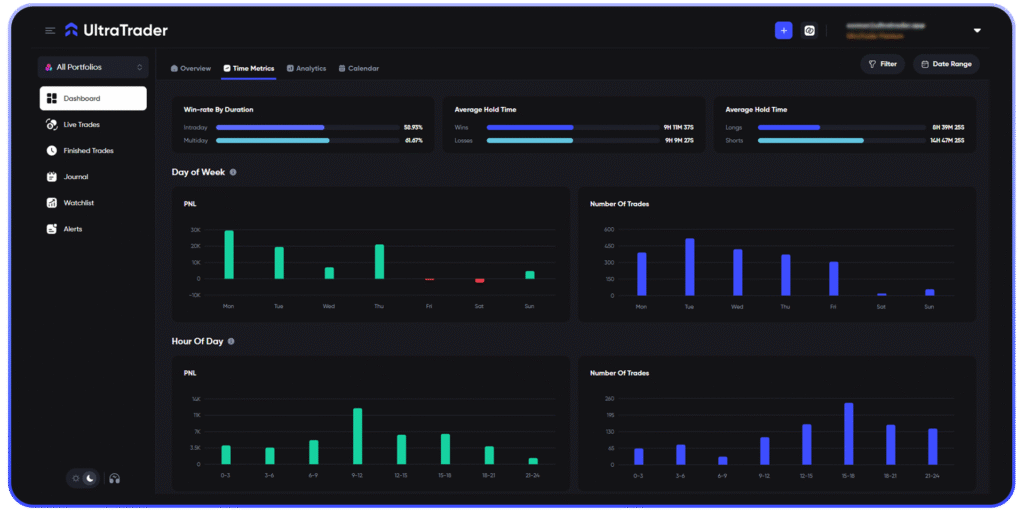
With UltraTrader you can:
- Connect supported exchanges and import trades automatically
- Track your portfolio and P&L over time
- Add notes, tags, and custom fields to your trades
- Log paper trades alongside real trades
- Use dashboards to see your performance by strategy, pair, or timeframe
Instead of fighting with spreadsheets or losing patience with manual logging, you can focus on making decisions and analyzing your behavior. The tool handles the heavy lifting for you.
How to Start Your First Trading Journal (Step by Step)
If you have never kept a trading journal before, start simple. Here is a practical process you can follow today.
Step 1: Define Your Primary Goal
Ask yourself: What is the main thing I want to fix or improve right now?
Examples:
- “I overtrade after a loss.”
- “I do not know which setups actually work for me.”
- “My risk per trade is not consistent.”
Your goal will guide what you pay most attention to in your journal.
Step 2: Choose Your Journaling Method
Pick one method that fits your current situation:
- If you are a complete beginner with a few trades per week:
- A simple spreadsheet or even a notebook is enough to start.
- If you are trading more actively and want stats:
- Use a spreadsheet or a trading journal app.
- If you are trading crypto on multiple exchanges or doing many trades:
- A dedicated app like UltraTrader with automated imports will save you a lot of time and errors.
Choose the simplest option that you can realistically maintain.
Step 3: Set Up Your Fields
Use the “What to include” list as your starting point. Create fields for:
- Date, instrument, direction, size, entry, stop, target, exit
- Set up the name and market conditions
- Confidence rating (for example, 1 to 5)
- Plan followed? (yes/no / partly)
- Short note
If you use UltraTrader, many of the numeric fields come automatically from the exchange or broker. You focus on the parts that only you can add: reasons, emotions, and lessons.
Step 4: Log Your Trades Consistently
Decide when you will journal:
- Right after each trade
- Or once per day at the end of your trading session
The key is consistency. In the beginning, it is better to log fewer trades with good notes than to log everything in a hurry.
Here is a simple example of one trade entry in plain language:
“BTCUSDT long, breakout of resistance. Risked 1 percent of the account. Entered on 15, 15-minute close above the level. Confidence 3 out of 5. Followed the plan. Exited at target. Lesson: waiting for candle close reduced fakeouts, keep doing this.”
That single short note is already valuable.
Step 5: Review Your Journal On A Schedule
A journal without review is just a diary. The real power comes from reading your own data.
Create a simple review routine:
- Daily:
- Look at the trades you took.
- Ask “Did I follow my plan?” and “What was my biggest mistake today?”
- Weekly:
- Group trades by setup or instrument.
- Look at which ones are profitable and which are not.
- Note any emotional patterns, such as overtrading on Mondays or after big wins.
- Monthly or quarterly:
- Review your overall equity curve.
- Decide which setups to focus on and which to cut.
- Update your trading plan based on what you learned.
UltraTrader can make this step easier by providing filters and visual dashboards that let you spot patterns more quickly.
Trading Journal Examples and Templates
Let us turn this theory into something concrete you can copy.
Simple Beginner Template
If you are just starting, use a minimal template like this:
- Date
- Market
- Long or short
- Entry, stop, target
- Result in R
- Setup name
- Emotion (1 to 5)
- Plan followed? (yes/no / partly)
- One sentence lesson
This template is light, fast, and perfect for building the habit of journaling.
Advanced Template For Active Traders
As you grow, you may want more detail. An advanced template can include:
- All basic fields from the beginner template
- Timeframe of entry
- Time of day or session (London, New York, Asia)
- Market condition tag (trend, range, news spike)
- Screenshots before and after the trade
- Tag for playbook or strategy version
- Mistake type (FOMO, revenge, oversize, early exit, late entry, etc.)
This level of detail lets you answer questions like:
- “Which strategy version is actually profitable?”
- “Which time of day gives me the best results?”
- “What type of mistakes cost me the most money?”
How These Templates Look Inside UltraTrader
In UltraTrader, many core fields are filled automatically from your trades:
- Market, direction, size, entry, exit, fees, P&L, and so on
You then enrich this data with:
- Custom tags for setups and strategies
- Notes about context and emotions
- Filters that show only the trades you want to study
Instead of building formulas and charts by hand, you can use built-in dashboards to see your performance by:
- Market
- Setup
- Timeframe
- Risk level
This is like an advanced template that lives inside a tool and updates itself as you trade.
Journaling for Different Markets: Crypto, Forex, Stocks, and More
Not all markets are the same. Your trading journal should reflect the specific challenges of the market you trade.
Crypto and Binance Trading Journal
Crypto markets are:
- Open 24/7
- Highly volatile
- Often traded on multiple exchanges
This creates unique journaling challenges:
- Many pairs and timeframes
- Overnight moves
- Fast changes in volatility
In a crypto or Binance trading journal, it is beneficial to log:
- Which exchange or pair did you use
- Time of day in UTC
- Funding events, major news, or listings
- Leverage and liquidation risk
With UltraTrader’s crypto trading journal, you can connect supported crypto exchanges and have your trades imported automatically, then focus on tagging and analyzing setups instead of typing in every entry.
Forex Trading Journal
Forex trading focuses heavily on:
- Sessions (London, New York, Asia)
- Macroeconomic news and events
- Pairs and correlations
Your forex trading journal should track:
- Session during the trade
- Important news releases near your entry or exit
- Pair type (major, minor, exotic)
- Spread and slippage issues
Patterns like “I lose more around high-impact news” or “I perform best in the London open” become clear with regular journaling.
Stock And Options Trading Journal
Stocks and options bring their own context:
- Premarket plans
- Earnings, company news, sector rotation
- Market open and close behavior
For stock traders, useful journal fields include:
- Premarket bias and levels
- Catalyst (earnings, news, analyst rating changes)
- Type of play (breakout, pullback, gap fill, etc.)
- Position management (scaling in or out)
You can also track whether you respected day-trading rules or personal limits, such as a max daily loss.
Algo And System Traders
If you trade with algorithms or mechanical systems, a journal is still useful.
You can log:
- Strategy name and version
- Parameter sets tested
- Market regime (for example, high or low volatility)
- Differences between backtest and live results
This helps you see where your system breaks, when it needs adjustments, and how it behaves across conditions.
Common Trading Journal Mistakes (and How to Fix Them)
Starting a journal is easy. Keeping a useful one is harder. Here are common mistakes and how to avoid them.
Mistake 1: Logging Only P&L
If you only record profit and loss, you are not really journaling. You are just copying your broker history.
Fix:
Always include at least the setup, reason for entry, and whether you followed your plan.
Mistake 2: Writing Too Much Or Too Little
Writing a full essay after every trade is not sustainable. Writing nothing but numbers is not helpful.
Fix:
Aim for one or two clear sentences per trade. Enough to understand what happened, not so much that you burn out.
Mistake 3: Being Inconsistent
Many traders journal only after big losses. This creates a biased view of their trading.
Fix:
Commit to journaling every trading day you participate in the market, no matter if you win or lose. Even “no trade” days can be logged with a short note like “no valid setups, stayed flat”.
Mistake 4: Never Reviewing The Journal
A journal that you never read is not helping you.
Fix:
Add review sessions to your calendar. Treat them like important trading appointments. This is where real improvement happens.
Mistake 5: Overcomplicating Templates
Endless columns and complex rules might feel smart, but they often kill consistency.
Fix:
Start simple. Add complexity only when you clearly see a need for it. Your journal should feel like a helpful tool, not homework.
From Raw Notes to Real Insights: Reviewing Your Trading Journal
Reviewing your journal is where you turn data into decisions. Here is how to do it:
1. Look For Repeat Patterns
Ask questions like:
- Which setups are consistently profitable?
- Which conditions lead to most of my losses?
- At certain times, days, or markets, do they hurt my performance?
Use tags, filters, and basic stats to answer these.
2. Identify Your Best And Worst Behaviors
Look at:
- Trades where you fully followed your plan
- Trades where you clearly broke your rules
You will often see that following the plan gives better long-term results, even if individual trades lose.
3. Turn Insights Into Rules
For example:
- Insight: “Most of my big losses happen when I increase size after a win.”
- New rule: “I cannot increase size immediately after a winning trade.”
- Insight: “My breakout trades work better in the London session than in Asia.”
- New rule: “I only take this setup in London hours.”
4. Update Your Trading Plan
Your plan should evolve based on evidence. Your journal provides that evidence. This creates a loop:
Plan → Trade → Journal → Review → Adjust plan → Repeat.
With UltraTrader, you can speed up this loop by using dashboards and filters instead of manual counting and sorting.
Why a Modern Trading Journal App Gives You an Edge
Manual journaling is useful, but it has limits, especially if you trade a lot or across multiple markets.
The Limits Of Manual Journaling
- Typing every trade gets boring
- You will make mistakes when copying data
- It is hard to maintain consistent formats
- Doing statistics by hand takes much effort
At some point, the friction becomes high enough that many traders stop journaling.
Key Features To Look For In A Trading Journal App
A good trading journal app should help you:
- Import trades automatically from exchanges and brokers
- Support multiple markets like crypto, forex, and stocks
- Add custom tags, notes, and fields
- See your trading performance dashboards with win rate, R:R, equity curve, and drawdowns
- Filter trades by setup, instrument, time of day, or market condition
The goal is simple: less manual work, more insight.
How UltraTrader Supports Your Journey From Mistakes To Mastery
UltraTrader is built around this idea.
With UltraTrader, you can:
- Connect exchanges and pull trades into your journal without manual input
- Tag trades by strategy, pair, timeframe, or market condition
- Log both real and paper trades in the same environment
- Use visual dashboards to spot patterns quickly
- Track fees, risk, and performance over time
For example, instead of asking “I think my BTC scalps are bad, but I am not sure”, you can filter “BTC, scalp setup, last 3 months” and see the exact stats.
This kind of clarity turns your journal into an edge, not a chore.
FAQ: Quick Answers About Trading Journals
Do I really need a trading journal as a beginner?
Yes. You do not need a complex one, but even a simple journal will help you build discipline and learn from your trades much faster.
Is a spreadsheet enough, or do I need an app?
A spreadsheet is fine to start with. If you become more active, trade across multiple markets, or want deeper analytics, moving to an app like UltraTrader will save you time and give you better insights.
How many trades should I log per day?
Ideally, every trade you take. If you make many trades, at least log all the trades that are outside your plan or emotionally driven. These are the ones that teach you the most.
How often should I review my trading journal?
Do a quick daily review and a deeper weekly review. Once a month or a quarter, do a big-picture review and adjust your trading plan.
Can I use a trading journal for crypto and Binance trades?
Absolutely. In fact, because crypto is fast and open 24/7, journaling is even more important. Tools like UltraTrader can import trades from supported exchanges, making this much easier.
What is the best free way to start a trading journal?
Open a simple spreadsheet or notebook and start logging your trades today using the beginner template from this article. The most important part is to build the habit.
Conclusion: Your Trading Journal Is The Bridge Between Mistakes And Mastery
Every trader makes mistakes. The question is whether you repeat them or learn from them.
A trading journal is how you turn painful experiences into structured lessons. It shows you what works, what fails, and who you are as a trader under pressure. It creates a clear path from chaos to consistency.
You do not need a perfect system to start. Begin with a simple template, log your trades, and review them regularly. As you grow, you can upgrade your process with tools that help you do more with less effort.
Suppose you want to move beyond manual logging and spreadsheets. In that case, UltraTrader gives you a modern trading journal with automated imports, powerful analytics, and a clean workflow that supports your journey from mistakes to mastery.
Your next trade will teach you something.
A good trading journal makes sure you do not waste the lesson.